
(Blog) [Security · PHP · WordPress · Website Security · Cybersecurity · UAE]
PHP2Shell vulnerability: How to audit, fix and verify your website

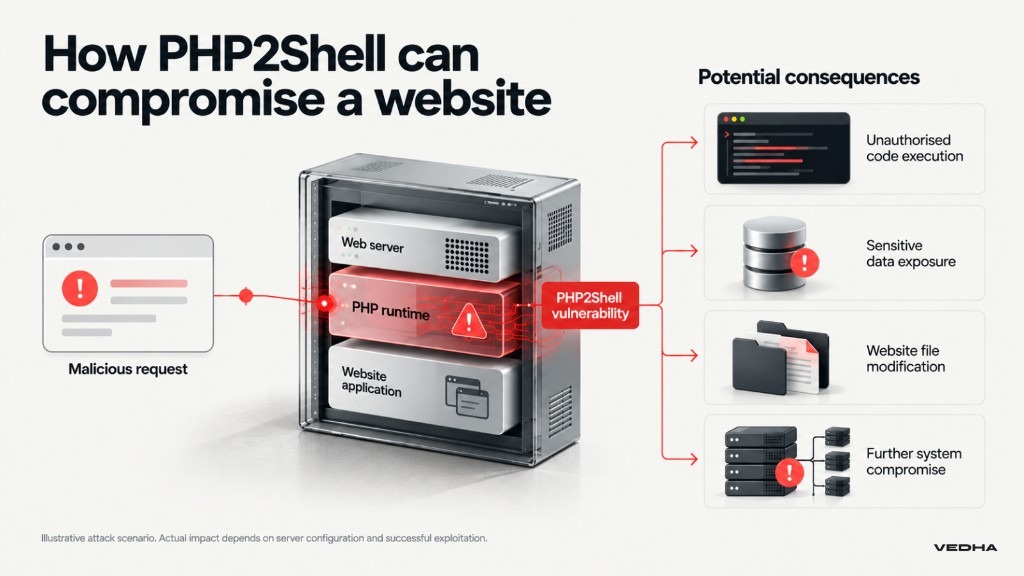
On 21 October 2026, critical security vulnerabilities known as PHP2Shell prompted emergency updates to PHP, the technology behind millions of websites, including WordPress and custom-built applications. These vulnerabilities could allow attackers to run malicious code on affected servers without needing to log in, potentially compromising websites and sensitive business data.
If your website runs on PHP, including WordPress or a custom PHP application, it's important to check whether it is affected and ensure the necessary security updates have been applied. You should also confirm that the updated version is running on your live website and check for signs of suspicious activity before the fix was installed.
What is the PHP2Shell vulnerability, and why does it matter?
PHP2Shell refers to two critical security flaws in PHP, the technology that powers many business websites, including WordPress and custom-built platforms. Both received a severity rating of 9.2 out of 10, making them particularly serious.
The vulnerabilities, identified as CVE-2026-109618 and CVE-2026-109619, could allow attackers to run malicious commands on an affected website's server without needing to log in. This could put your website, business operations and sensitive information at risk.
Because the flaws exist in PHP itself, keeping your website's plugins, themes or content management system updated may not be enough. Your hosting provider or developer must also ensure that the underlying PHP software is secure.
Is PHP2Shell being actively exploited?
Yes. Amazon Threat Intelligence detected exploitation attempts as early as 17 October 2026, four days before the vulnerabilities were publicly disclosed.
On 26 October 2026, security researchers also reported confirmed remote code execution against a vulnerable Apache server running PHP 8.4.26. This demonstrates that attackers can successfully exploit PHP2Shell under vulnerable conditions.
Businesses should prioritise applying the security updates and reviewing server activity for signs of earlier compromise.
Which PHP versions and websites are affected?
The PHP project released patches for four maintained branches on 21 October 2026. Compare your website's PHP version against the first fixed release below.
| PHP branch | Vulnerable upstream versions | First fixed version |
|---|---|---|
| PHP 8.5 | 8.5.11 and earlier | 8.5.12 |
| PHP 8.4 | 8.4.26 and earlier | 8.4.27 |
| PHP 8.3 | 8.3.35 and earlier | 8.3.36 |
| PHP 8.2 | 8.2.34 and earlier | 8.2.35 |
| PHP 8.1 and older | Older unsupported upstream releases | Upgrade or verify a vendor-supported fix |
Source: PHP official security advisory, 21 October 2026.
Some hosting providers use backported patches, which apply security fixes to older PHP releases without changing the displayed version number. Ask your provider to confirm whether such a fix is installed.
Does PHP2Shell affect WordPress and other websites?
Yes. PHP2Shell can affect WordPress, Drupal, Magento, custom PHP websites and online stores. Even if your website's plugins and themes are updated, the underlying PHP software may still be vulnerable.
Ask your hosting provider or developer to confirm that your server has received the necessary PHP security updates.
An additional PHP vulnerability disclosed on 23 October
On 23 October 2026, PHP disclosed a separate vulnerability, CVE-2026-115560, affecting certain website configurations that use session upload progress. The 21 October PHP2Shell patches do not fully address this issue.
As a precaution, PHP recommends disabling the feature using session.upload_progress.enabled=0 until a fix is available. Ask your hosting provider or developer to check whether your website is affected and follow the official PHP security advisories for updates.
How can you check whether your website is vulnerable to PHP2Shell?
Start by identifying the PHP version running your live website. You can usually find this through WordPress, your hosting dashboard or your server administrator.
Step 1: Check your website's PHP version
- WordPress: Go to Tools → Site Health → Info → Server to find your PHP version.
- cPanel or Plesk: Check your domain's PHP settings.
- Linux server: Ask your administrator to check the active PHP version and installed security updates.
Technical users can run php -v, but this only shows the command-line PHP version. Your live website may use a different PHP installation, such as PHP-FPM, so your administrator should verify the version actually serving web requests.
Step 2: Assess your PHP2Shell exposure
Use the following table to determine your next action.
| Status | What it means | Next action |
|---|---|---|
| Vulnerable | Your live website uses an affected PHP version without the required fix. | Install the security update. |
| Confirmed patched | Your live PHP installation has the fixed release or a verified vendor patch. | Check for suspicious activity before the update. |
| Awaiting verification | Your provider has not confirmed which PHP version is running or whether the fix is active. | Request written confirmation and patch details. |
An older PHP version may still be protected if its vendor has applied a documented security patch. If you cannot verify this, treat your website's security status as unresolved.
How do you fix the PHP2Shell vulnerability?
To protect your website against PHP2Shell, your hosting provider or developer needs to install the appropriate PHP security updates. Firewalls and other security measures can help reduce the risk of an attack, but updating the affected software is essential.
Follow these steps:
- Identify affected installations. Check live websites, staging environments and other PHP applications.
- Install the security update. Upgrade to a fixed PHP version or apply a verified vendor patch covering both vulnerabilities.
- Restart affected PHP services. Restart PHP workers or redeploy affected containers so the updated software is active.
- Test your website. Check important functions such as login, checkout, file uploads and contact forms.
What if you cannot patch immediately?
If your website cannot be updated immediately, your hosting provider can apply temporary security measures, such as adjusting server settings or using a web application firewall (WAF) to block suspicious requests.
These measures may reduce the risk but cannot replace the PHP security update. Ask your provider to follow the official PHP guidance.
How can you verify that your hosting provider has patched PHP2Shell?
An update confirmation does not necessarily mean your live website is protected. Ask your hosting provider or developer to verify the following:
- The security fix is installed. Confirm that the PHP release or vendor patch addresses both CVE-2026-109618 and CVE-2026-109619.
- Your live website is using the patched version. Verify the PHP runtime processing actual website requests, rather than relying only on the command-line version.
- The update is fully deployed. Confirm that affected PHP workers, servers and containers have been restarted or replaced.
If your provider uses an older PHP release with a backported fix, request the relevant vendor advisory. Also ask whether the separate 23 October vulnerability affects your server configuration.
Who is responsible for fixing PHP2Shell?
Responsibility depends on your hosting environment and service agreement.
| Hosting environment | Typical update responsibility |
|---|---|
| Shared hosting | Hosting provider, sometimes with account-level PHP selection |
| Managed WordPress hosting | Hosting provider |
| Self-managed VPS | Your server administrator |
| Cloud servers or containers | Your infrastructure or development team |
| Managed application platform | Platform provider and application team, depending on responsibilities |
Even if your hosting provider manages updates, request written confirmation that your website is protected and ask whether any additional investigation is needed.
Is your website safe after patching, or do you still need a security audit?
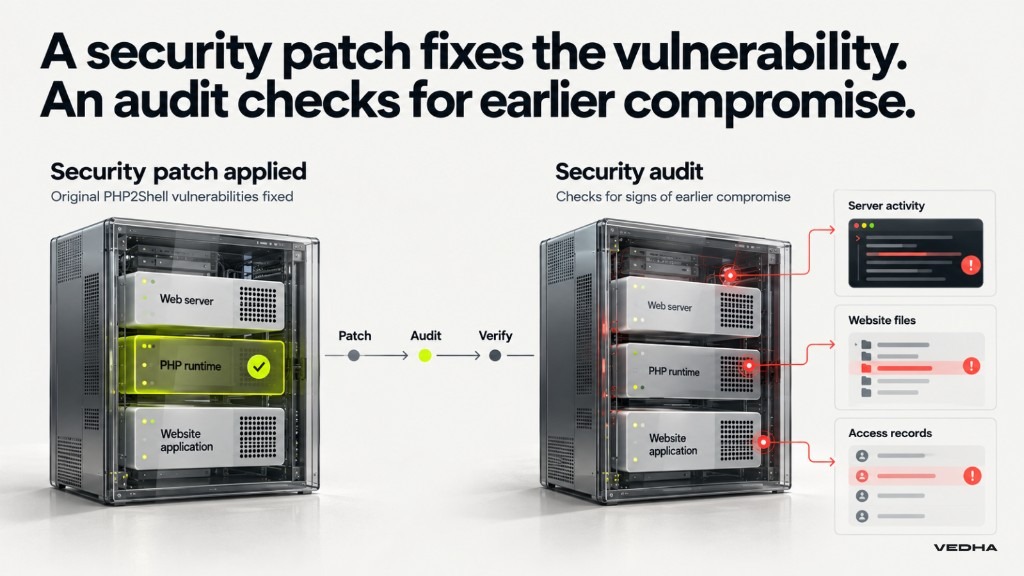
Updating PHP protects your website against the original PHP2Shell vulnerabilities, but it cannot undo any damage caused before the update.
If attackers gained access earlier, they may have modified website files or accessed sensitive information. A post-patch security audit can identify signs of compromise and determine whether further action is needed.
A company like Vedha can help businesses assess their website's security, investigate potential vulnerabilities and determine the next steps to protect their systems.
What should a PHP2Shell security audit cover?
A security audit should examine your website, server and available activity records for signs of compromise.
| Audit area | What to check |
|---|---|
| Patch verification | Confirm the correct PHP security updates are active |
| Server activity | Review unusual requests, errors, processes and network connections |
| Website files | Identify unfamiliar PHP files or unauthorised changes |
| User access | Check administrator accounts and potentially exposed credentials |
| Security settings | Review session settings and relevant server protections |
The scope depends on your hosting environment and the information your website handles. Suspected breaches may require a deeper investigation beyond a standard vulnerability scan.
How can you identify signs of earlier exploitation?
Amazon Threat Intelligence recommends reviewing web server logs for suspicious requests, including POST activity involving PHP_SESSION_UPLOAD_PROGRESS. Investigators should also check for unexpected processes and changes to website files.
Where records are available, review activity from at least 17 October 2026, when Amazon observed an exploitation attempt.
A suspicious request does not necessarily mean your website was breached. However, a clean scan alone cannot rule out an earlier compromise. If there are unexplained findings or gaps in your records, consider a more detailed security assessment.
What should you do if your audit finds suspicious activity?
If your audit identifies unusual files or server activity, involve your technical team or a security specialist. Avoid deleting evidence before the incident has been investigated.
Follow these five steps:
- Preserve evidence. Save relevant logs, server snapshots and security records.
- Contain the threat. Restrict affected services or access to prevent further damage.
- Investigate the impact. Determine what systems, files or information may have been accessed.
- Recover securely. Remove confirmed malicious changes, reset compromised credentials and restore trusted backups where needed.
- Verify the recovery. Confirm the updates are active, test website functionality and monitor for further suspicious activity.
If personal or confidential information may have been exposed, assess any applicable legal, regulatory or contractual notification requirements.
How can Vedha help you audit and secure your PHP website?
Our Application Security Services help businesses identify vulnerabilities, assess security risks and implement the necessary fixes. Whether you operate a WordPress website or a complex enterprise application, Vedha can tailor a security audit to your systems and requirements.
Concerned about your website's security? Book a free consultation with Vedha to understand the risks and determine the actions needed to address them.
FAQs about PHP2Shell
Does updating WordPress fix PHP2Shell?
No. Updating WordPress, plugins and themes does not automatically update PHP. Your hosting provider must also confirm that the underlying PHP software has received the necessary security fixes.
Can a firewall protect your website against PHP2Shell?
A web application firewall can help block known attacks, but it cannot guarantee protection. Updating PHP remains essential.
Can an older PHP version be protected against PHP2Shell?
Yes. Some providers apply security fixes to older PHP releases without changing the version number. Ask your administrator to verify the installed patch against the vendor's security advisory.
Does PHP2Shell affect websites without login pages?
Yes. Under exploitable conditions, attackers may be able to run malicious code without logging in. Removing login functionality does not fix the underlying vulnerability.
How much does a website security audit cost?
Vedha offers website security audits starting from AED 2,500 for smaller CMS-based websites, including WordPress. Security assessments are also available for larger businesses and enterprise applications, with pricing based on the complexity of their systems and technology stack.