
(Blog) [Gemini Tool Retrieval · AI Agents · API Integration · MCP · CRM · ERP · UAE]
Google's Gemini Tool Retrieval: How AI Agents Can Connect to Your Business Systems
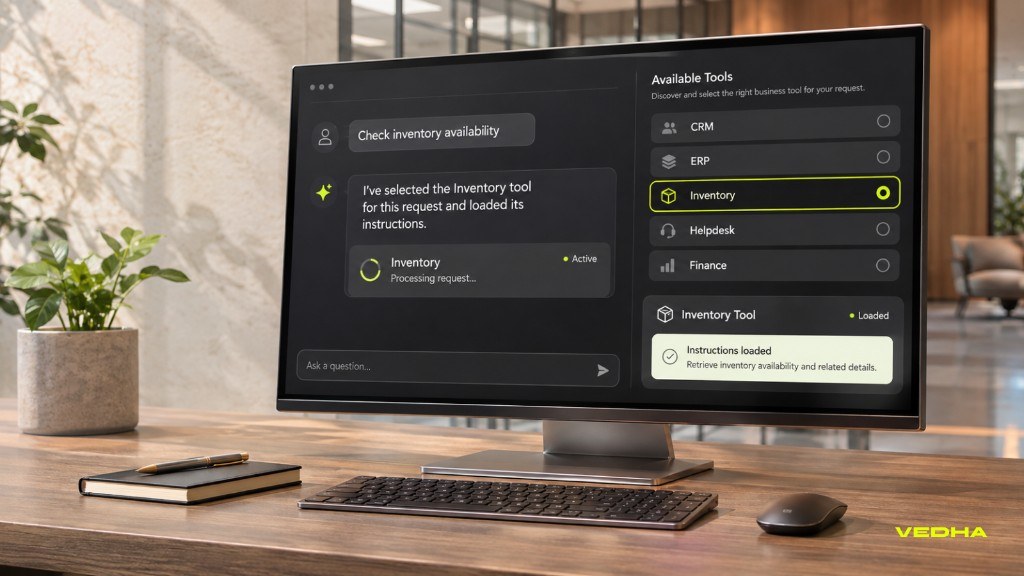
Imagine asking an AI assistant to check a customer's order, confirm stock in your ERP and create a follow-up task in your CRM. Each action may involve a different system and its own set of tools. As businesses connect more applications, helping an AI agent find the right tool becomes a challenge in itself.
On 19 November 2026, Google introduced Gemini Tool Retrieval, a new capability designed to make large tool libraries easier for AI agents to use. The development matters for organisations exploring AI agent integration and business process automation, but it does not remove the need for secure connections and dependable workflows.
Quick answer: Gemini Tool Retrieval lets compatible AI agents find and load detailed instructions for relevant software tools only when needed. This can reduce unnecessary input tokens and simplify working with large tool libraries. Businesses still need reliable APIs, appropriate access permissions and well-designed integrations before an agent can act across their systems.
What is Gemini Tool Retrieval, and what has Google announced?
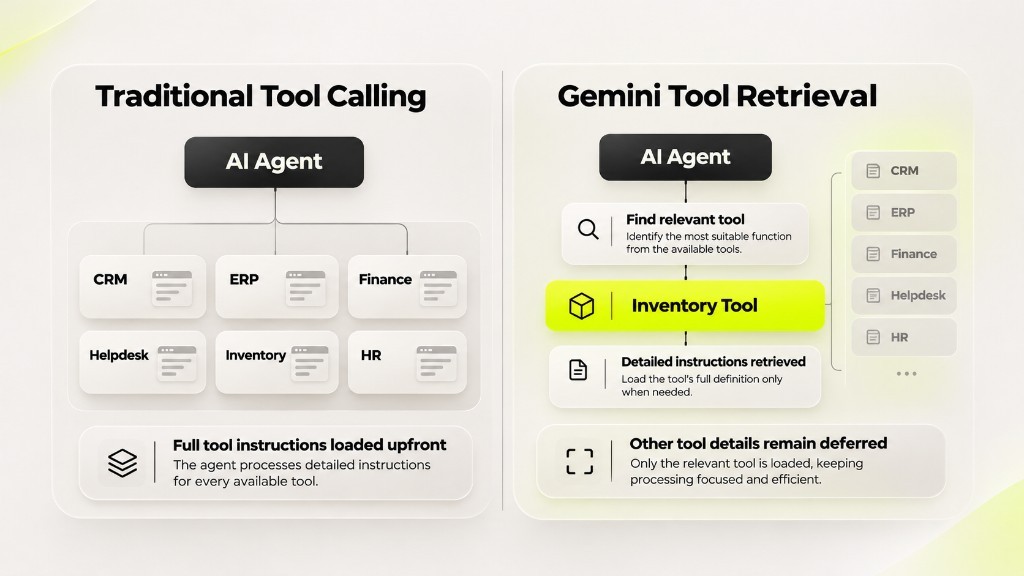
Google announced Tool Retrieval on 19 November 2026 as a preview feature in the Gemini Interactions API. Here's what it introduces:
- Smarter tool selection: Helps AI agents identify relevant functions, such as checking inventory, retrieving customer records or creating tasks.
- More efficient processing: Instead of loading detailed instructions for every available tool, the agent retrieves only those needed for a particular task.
- Developer availability: Supports Gemini 3.6 and later models, including Gemini 4, through the Interactions API. It does not automatically connect the consumer Gemini app to business systems.
Why do AI agents struggle when connected to too many tools?
Unlike a conventional chatbot, an AI agent can use tools to perform actions, such as retrieving invoices or updating support tickets. Each tool has its own instructions describing what it does and the information it needs.
As businesses invest in custom AI agent development and connect agents to more applications, three challenges emerge:
- More tools to choose from: An agent connected to a CRM, ERP, helpdesk and document platform may have dozens or hundreds of functions available.
- Higher processing overhead: Loading every tool's detailed instructions consumes input tokens, increasing the amount of information processed and potentially raising costs.
- More difficult tool selection: The agent must sift through unrelated instructions, making it harder to identify the correct function.
For example, an AI assistant checking stock availability shouldn't need the full instructions for payroll, invoicing or employee onboarding. It only needs to identify the relevant inventory tool and retrieve its details.
How does Gemini Tool Retrieval work?
Tool Retrieval separates discovering a tool from loading its full instructions. With Google's server-side approach, an agent can see the names and descriptions of deferred tools while their detailed input requirements, called parameter schemas, remain outside its immediate context.
The process works as follows:
- Discover: The user requests an action, and the agent identifies a matching tool from the available descriptions.
- Retrieve: The Gemini API loads that tool's full parameter schema so the model knows which inputs to provide.
- Request an action: The model produces a function call. The application executes the actual operation and returns the result.
Developers enable this behaviour using tool_search and defer_loading: true in the Interactions API. Google's server-side retrieval performs discovery and schema loading within the same API request; executing a business function remains the application's responsibility.
Additional capabilities include:
- Flexible tool loading: Frequently used functions can remain available immediately, while less common tools are retrieved only when needed.
- Visible tool-selection steps: The Interactions API records tool searches, retrieved definitions and function calls, helping developers investigate incorrect selections.
- Client-side retrieval: Developers can search their own tool registries and apply permission filters, providing greater control at the cost of an additional exchange.
- Mid-conversation tool discovery: Newly connected applications can make their authorised functions available during an ongoing conversation, provided secure integrations are in place.
How do Tool Retrieval, MCP and APIs work together?
Tool Retrieval, the Model Context Protocol (MCP) and APIs solve related but different problems. Understanding their roles helps avoid a common misconception: making a tool discoverable does not make an existing business system accessible or authorised.
| Technology | What it does | Business example |
|---|---|---|
| API | Allows software applications to exchange information and perform permitted actions | Retrieve stock levels from an ERP |
| MCP | Provides a standard interface for AI applications to access tools and resources | Present approved ERP functions through an MCP server |
| Tool Retrieval | Helps a Gemini agent find and load the relevant tool definition | Select the stock-check function from a large tool library |
Google supports remote MCP servers with Tool Retrieval. Developers can defer the tools exposed by a compatible MCP server rather than loading all their parameter schemas upfront. This can make a growing set of agent-facing capabilities easier to manage.
However, an MCP server still needs working connections to the underlying software. Authentication, business rules and permission checks must be enforced by the connected systems. Tool Retrieval is not a replacement for API development, and it is not the same as retrieval-augmented generation (RAG), which supplies relevant knowledge or documents rather than tool definitions.
How can AI agents work across CRM, ERP and other business systems?
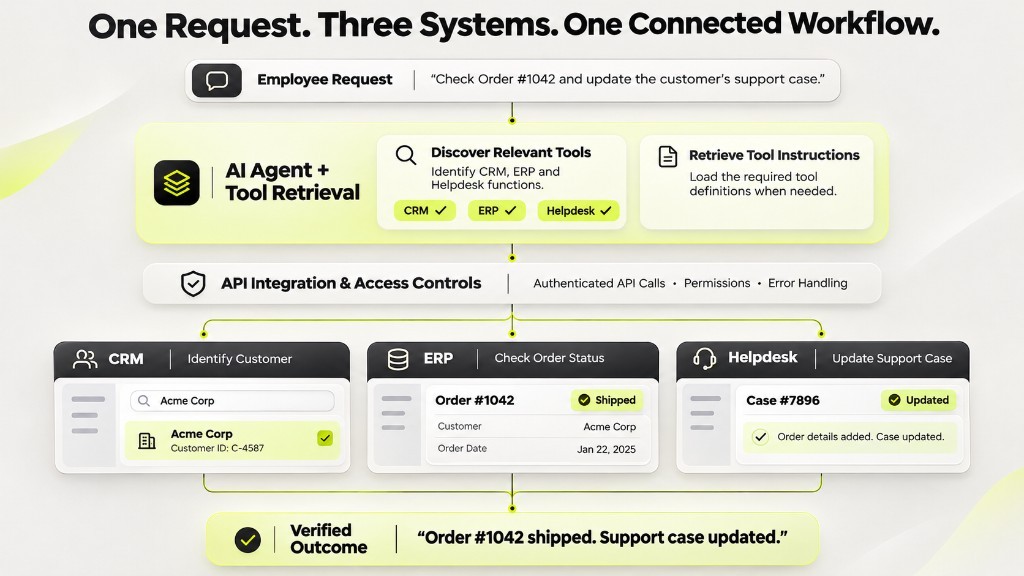
The business value becomes clearer when an agent can support a complete task across applications. Imagine an employee asking, “Has this customer's order shipped, and can you update their support case?”
With suitable CRM and ERP integrations, the agent could select a CRM tool to identify the customer, an ERP or logistics tool to check the shipment and a helpdesk tool to update the case. This is a hypothetical workflow, not an out-of-the-box capability provided by Tool Retrieval.
| Business request | Connected system | Possible authorised action |
|---|---|---|
| “Is this product available?” | ERP or inventory system | Retrieve current stock and variants |
| “What's happening with this account?” | CRM | Retrieve the latest customer activity |
| “Log this delivery issue.” | Helpdesk | Create or update a support ticket |
| “Prepare this invoice for approval.” | Finance and workflow systems | Retrieve details and create a pending approval |
These examples show why AI workflow automation needs more than a capable model. API integration services help establish the connections, but an agent also needs accurate data, clear rules for selecting records and a reliable way to report failed or unfinished actions.
Sensitive actions such as issuing refunds, changing payment information or approving purchases should be governed by permissions and, where appropriate, explicit human approval.
What are the benefits and limitations of Gemini Tool Retrieval?
For AI agents connected to multiple business applications, Gemini Tool Retrieval offers three main potential advantages:
- Lower processing costs: Loading only relevant tool instructions can reduce input-token usage, particularly when an agent has access to a large tool library.
- Faster, more focused responses: With fewer unnecessary instructions to process, agents may identify the right tools more efficiently and respond faster.
- Easier to scale integrations: Developers can expand the range of available tools without loading every function's complete requirements into each request.
What should businesses consider? Tool Retrieval is currently in preview, and its benefits depend on the number and complexity of available tools. Smaller applications may see limited improvements, while client-side retrieval introduces additional processing in exchange for greater control. Google does not charge a separate Tool Retrieval fee, although standard model token charges still apply.
Businesses should test performance and costs in their own applications while ensuring that tool execution remains secure and properly monitored.
What should businesses prepare before integrating AI agents?
Before adopting Gemini Tool Retrieval or investing in enterprise AI solutions, review the systems and processes the agent would need to use. Good AI solution architecture determines whether tool calls lead to useful, controlled business outcomes.
- Choose a bounded use case: Start with one repeatable process, such as looking up order status or preparing support tickets, and define what successful completion means.
- Assess existing APIs: Check whether your CRM, ERP and other platforms expose the required functions, and whether the information is reliable and current.
- Define access controls: Give each agent only the tools and records necessary for its task. Require approval for sensitive changes and enforce restrictions in the underlying systems.
- Design for failures: Set sensible timeouts, handle API limits, prevent duplicate actions and distinguish completed tasks from those still pending.
- Test and monitor: Evaluate incorrect tool choices, ambiguous requests, failed calls, response times and the business impact of errors before expanding access.
For some businesses, the priority may be improving an existing API integration rather than adopting a new AI feature. Others may need custom middleware to connect legacy applications or a shared permissions layer before deploying agents across departments.
How Vedha helps build AI agents that work with existing systems
Gemini Tool Retrieval makes it easier for AI agents to find the right tools, but reliable results still depend on secure integrations, accurate data and well-designed workflows.
Vedha Technologies provides custom AI agent development and practical AI integration services through its AI Solutions and API & Systems Integration capabilities. We help businesses design AI assistants and workflow agents that connect securely with CRM, ERP, legacy platforms and other applications.
The objective is to build AI around your existing operations, not introduce another disconnected tool. Exploring AI agents for your business? Book a free consultation with Vedha to discuss your systems, integration requirements and a practical starting point.
FAQs
Does Gemini Tool Retrieval automatically connect AI agents to business applications?
No. It helps agents discover and load tool definitions. Developers must still implement the underlying APIs, authentication, permissions and execution logic.
Is MCP required to use Gemini Tool Retrieval?
No. Google's feature supports deferred function definitions directly and can also work with compatible remote MCP servers.
Is Gemini Tool Retrieval available for all Gemini models?
No. At launch, Google lists Gemini 3.6 and later models, including Gemini 4, within the Interactions API. The feature is in preview.
Can businesses use Tool Retrieval with their existing APIs?
Potentially, yes. Existing APIs can be exposed through appropriately designed agent tools or compatible MCP integrations, subject to their capabilities and security requirements.