
(Blog) [Microsoft 365 · Solution Architecture · API Integration · Business Continuity · Reliability · UAE]
Microsoft 365 Outage: How to Build More Resilient Business Software
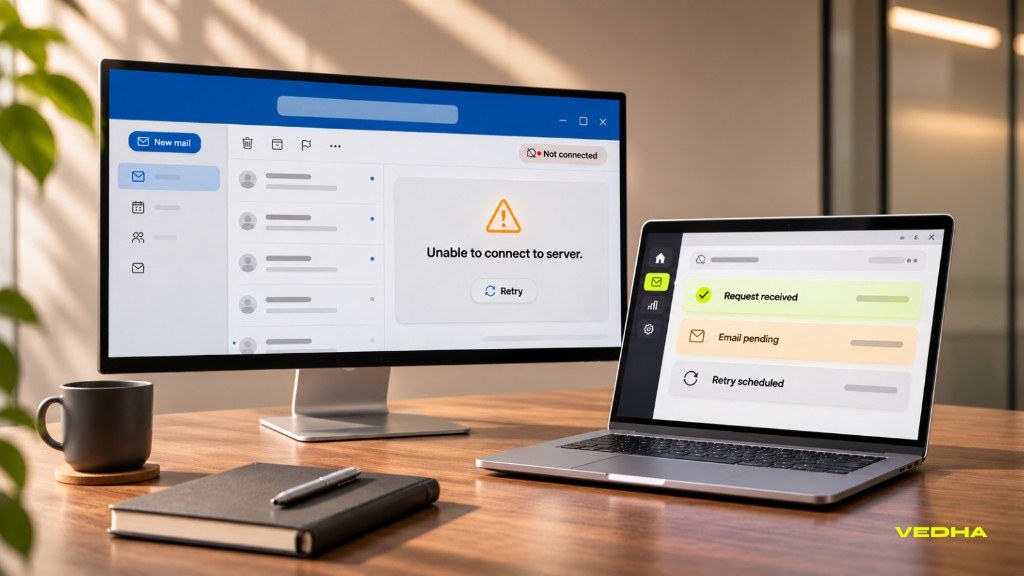
A customer submits a request through your website and receives a confirmation. Behind the scenes, your software should notify the relevant team, create a task and update your CRM. But what happens if the email service stops responding? Has the request been recorded successfully, or is it sitting unnoticed?
The Microsoft 365 outage that began on 12 November 2026 highlighted how disruptions to Exchange Online and Microsoft Graph APIs can affect seemingly unrelated business processes. It reinforces the importance of professionally designed solution architecture that anticipates points of failure, addresses potential vulnerabilities and safeguards business continuity.
Quick answer: Businesses cannot prevent a third-party provider from experiencing an outage, but they can design their applications to handle one. Reliable integrations save critical information independently, distinguish completed tasks from pending ones, retry safely and verify that unfinished work is processed after service returns. The priority is business workflow continuity, not simply keeping every application online.
What happened during the November 2026 Microsoft 365 outage?
On 12 November 2026, Microsoft reported two related service disruptions (EX1550543 and MO1550821) affecting several Microsoft 365 services:
- Exchange Online and Outlook: Problems accessing mailboxes and delays in email delivery.
- Teams, SharePoint, Planner and Copilot: Disruptions to certain features and functionality.
- Microsoft Graph API: Connection issues affecting third-party applications that access emails, calendars and contacts.
Status as of 15 November 2026: Microsoft confirmed that services were restored on 13 November at 8:10 pm UAE time. Preliminary findings linked the outage to an issue involving an earlier network capacity upgrade. Microsoft confirmed that the disruption was unrelated to cybersecurity threats or AI agents. A full post-incident report is expected.
The impact of such outages can extend beyond Microsoft applications. For example, a booking portal may appear fully operational while its connection to a shared calendar prevents it from confirming appointments.
How can a Microsoft 365 outage disrupt your own software?
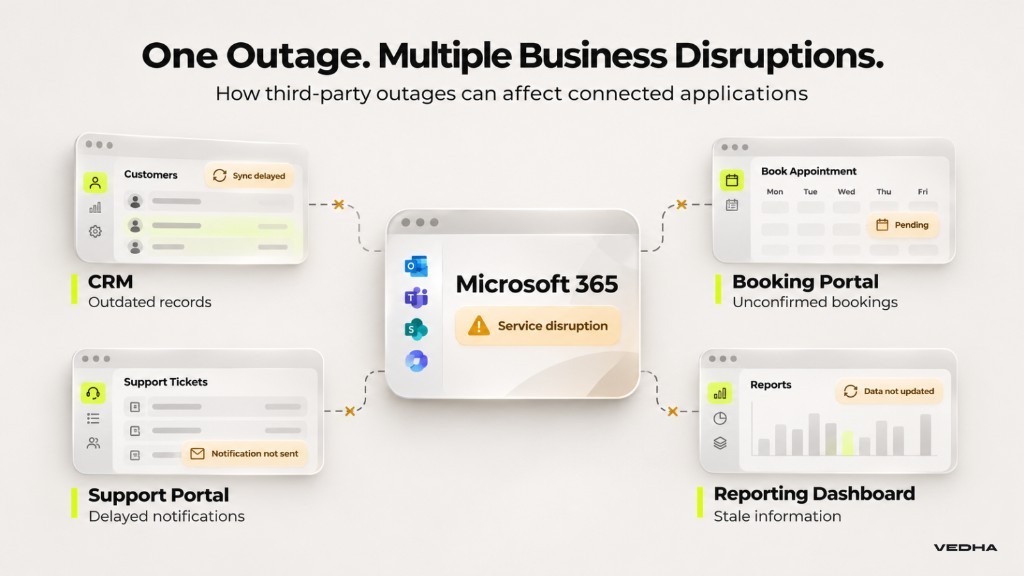
A CRM may use Microsoft Graph to synchronise meetings, while a service portal relies on Exchange Online for employee alerts. To users, these integrations are often invisible.
Consider a hypothetical customer support portal that performs three actions when someone submits a request:
- Saves the request in its own database.
- Sends an email alert to the support team.
- Creates a follow-up task for an employee.
If the request is saved but the email fails, the portal has only completed part of the workflow. Displaying “Request completed” without tracking the failed notification may leave staff unaware of the customer. Conversely, rejecting the entire submission after saving it could encourage the customer to try again and create a duplicate record.
The same issue can occur less visibly with data synchronisation. If a CRM's calendar integration stops updating, a dashboard might continue displaying old meeting information. Without a visible last synchronised time, employees may assume the records are current and make decisions based on outdated data.
These are hypothetical examples, not confirmed effects of the November outage. Your applications should recognise partial failure and communicate its status accurately.
Which parts of a workflow must continue, and which can wait?
Not every step needs to happen immediately. A website may need to save a customer enquiry before confirming receipt, but an internal notification could be sent later if the request is stored securely and the delay is visible to the team. The response depends on each step's importance.
| Workflow step | Possible response when a dependency fails | What the business must verify |
|---|---|---|
| Save a customer enquiry | Do not confirm receipt until the record is saved | The request exists in the primary system |
| Send an internal email alert | Save the notification as pending and send it later | Staff can still see unattended requests |
| Create a calendar booking | Keep the booking unconfirmed until availability is verified | The customer is not promised an unreserved slot |
| Synchronise a dashboard | Display the last successful update time | Employees know when data may be outdated |
| Process a payment | Follow payment-provider verification and reconciliation rules | The customer is not charged twice |
The right fallback depends on the workflow. Systems should distinguish successful submissions from pending and failed actions.
Critical operations may also need a tested manual process or independent communication channel. Microsoft recommends evaluating reliability across the complete business workflow, including its external dependencies.
What does a resilient integration do when a dependency fails?
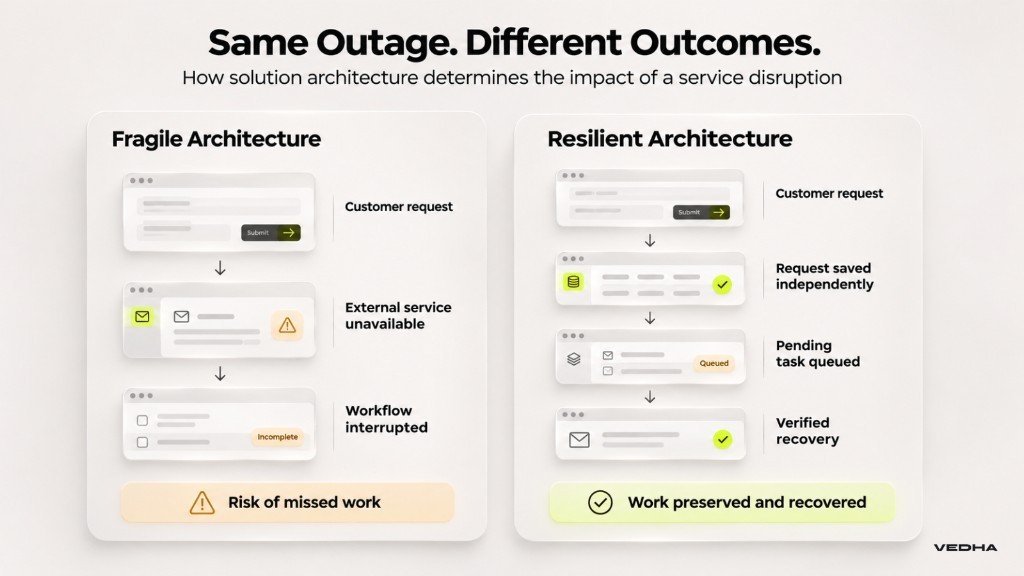
A resilient API integration anticipates timeouts, temporary errors and extended disruptions without losing track of the business task.
- Set timeouts and controlled retries: Prevent applications from waiting indefinitely when external services fail. Retry temporary errors carefully and respect API rate limits. Since a timed-out request may have already succeeded, verify its status before retrying to avoid duplicate actions.
- Save pending work: Use durable queues to store tasks that can safely wait, such as email notifications, until the external service recovers. This allows applications to continue recording customer requests without losing unfinished work. Monitor pending tasks and prevent duplicate processing.
- Make failures visible: Clearly distinguish completed, pending and failed actions. Display accurate status messages to users and monitor API errors, delayed tasks and failed synchronisations so teams can identify problems and respond promptly.
How do you prevent missed or duplicate work when service returns?
Restoring a service does not automatically complete missed notifications, bookings or synchronisations. Some timed-out requests may already have succeeded, so repeating them without verification can create duplicates, such as multiple bookings or payments. Always confirm the outcome before retrying an action.
A reliable recovery process should:
- Identify each action uniquely. Give requests and jobs stable reference numbers so the application can recognise previous attempts.
- Check uncertain outcomes. Where supported, look for the original result before creating another record or transaction.
- Reconcile differences. Compare what your application accepted with what the external system actually processed.
- Process backlogs carefully. Resume queued work at a rate the returning service can handle, rather than sending every delayed request simultaneously.
- Escalate persistent failures. Send unresolved jobs for investigation instead of retrying indefinitely.
Data synchronisation may need its own recovery process. Microsoft Graph offers delta queries for certain resource types, allowing applications to retrieve changes since an earlier synchronisation. This can help rebuild an accurate local record when updates were missed. However, availability depends on the resource, and applications must account for expired tracking tokens and repeated results.
Provider availability is not proof of workflow recovery. Critical outstanding actions still need to be checked and handled.
How can you find the hidden dependencies in your business?
A business may know its CRM connects to Microsoft 365 without realising that bookings, notifications and reporting also rely on it. Trace an essential workflow from the customer's first action to the final result.
Vedha's guide to turning standard operating procedures into digital workflows explains how mapping existing processes can reveal the people, approvals and systems involved before automation begins. The same exercise can expose dependencies that create reliability risks.
For each critical workflow, ask:
- Where is the original record stored? Can employees still access a request if email or notifications fail?
- Which services does it depend on? Include indirect links through middleware, automation platforms and APIs.
- What happens if one step fails? Does the application stop, save unfinished work or mistakenly report success?
- Who will be alerted? Is someone responsible for reviewing delays and unsuccessful transactions?
- How will work be recovered? Can the team identify outstanding tasks and avoid duplicates?
- Has the process been tested? Simulate timeouts, intermittent errors and restoration, not only complete service outages.
Prioritise vulnerabilities based on customer impact and business risk. A comprehensive solution architecture assessment should examine the entire software ecosystem for potential points of failure, security weaknesses, integration dependencies and inadequate recovery mechanisms. Testing individual components is not enough; businesses need to understand how their systems respond collectively when something goes wrong.
How Vedha helps
The Microsoft 365 outage reinforces the importance of having your solution architecture designed and assessed by experienced technology professionals.
At Vedha Technologies, we look beyond individual software requirements to understand how entire business systems operate together. Through our expertise in solution architecture and API & Systems Integration, we help businesses identify architectural weaknesses, assess potential vulnerabilities, improve integration reliability and implement safeguards against unexpected disruptions.
The objective is not simply to build software that works under ideal conditions, but to build resilient systems that account for what could go wrong.
How resilient is your existing solution architecture? Book a free consultation with Vedha to discuss your business systems and integration requirements.
FAQs
Will a backup internet connection solve a Microsoft 365 outage?
Not when the problem is within Microsoft's services. A secondary internet connection can help with local connectivity issues, but it cannot restore an unavailable mailbox or API. Check Microsoft's service-health dashboard to identify the source of a disruption.
Should every failed API request be retried?
No. The correct response depends on the error and the action involved. Respect Retry-After instructions when an API is throttling requests, and check whether an uncertain action already succeeded before retrying operations that could create duplicates.
Can a business application keep accepting requests when email is unavailable?
Yes, in some cases. If the application saves requests independently and email is only a notification, it may continue accepting them while marking alerts as pending. Critical processes still need an accessible record, appropriate monitoring and a recovery plan.
How can businesses verify that delayed work was completed?
Compare saved requests with downstream records, review outstanding jobs and investigate failed or uncertain transactions. Where supported, change-tracking features can help reconcile missed updates. Confirmation should reflect the completed business action, not simply the return of the external service.